


How to Disable the Z31 Turbo Speed Limiter
Nissan programmed the ECU in every US-market Z31 Turbo to cut the engine back at about 137 mph. Non-turbo models don't have a limiter in the ECU; they're limited only by power.
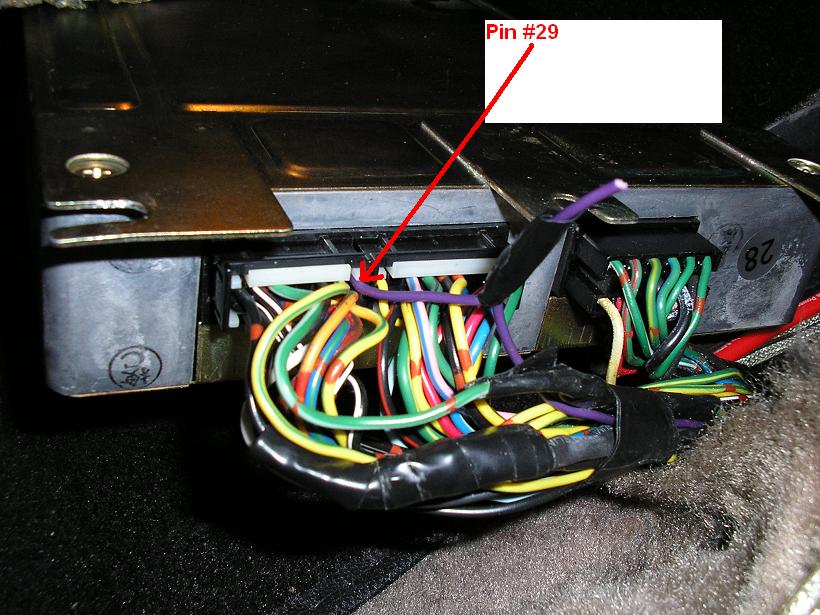
The ECU knows the car's speed from the vehicle speed sensor signal, which comes in on a purple wire at ECU pin 29. Disconnect that signal and the ECU can't tell how fast the car is going, so the limiter never kicks in.
Before you do this: make sure your tires are rated for the speeds you plan to
drive (check the speed rating on the sidewall), and that the brakes, suspension and the rest of the car are up to
it. Old tires, worn parts and public roads don't mix with these speeds; this is for track use.
Disconnecting the Speed Signal
- Disconnect the negative battery cable.
- Get to the ECU and its harness connector. Find pin 29 using our ECU pinout; it's the purple wire.
- Cut the purple wire a short way back from the connector, and insulate both ends.
- Reconnect the battery.

Make it reversible
Instead of just cutting the wire, crimp a pair of insulated male and female spade terminals onto the two cut ends. Pull them apart to disable the limiter, and plug them back together to restore the stock setup, for example before you sell the car.

This only cuts the speed signal to the ECU; the speedometer keeps working. If someone else tunes
the car later, for example with Nistune, tell them about this mod.
Sources
- Nissan 300ZX factory service manual
- Photos: Nissanxrma, from HybridZ